2019年11月9日土曜日

rasberrypiにstackをインストールしてビルドできるようにする

rasberrypi3 にhaskellのビルドツールstackをインストールして、ビルドできるようにする。
過去の情報は色々あったのですが、古い情報であったので、2019年版としてまとめておきます。

> curl -sSL https://get.haskellstack.org/ | sh
> stack new sample
> stack build
エラー発生
No setup information found for ghc-8.6.5 on your platform.
This probably means a GHC bindist has not yet been added for OS key 'linux-armv7'.
Supported versions: ghc-7.10.2, ghc-7.10.3, ghc-8.0.1, ghc-8.0.2, ghc-8.2.1, ghc-8.2.2, ghc-8.6.3

ghc-8.6.3に変更して、再度ビルド したが、別のエラーが発生した。
armの命令が不足しているとエラーが出力される。
[1 of 2] Compiling Main             ( /home/pi/.stack/setup-exe-src/setup-mPHDZzAJ.hs, /home/pi/.stack/setup-exe-src/setup-mPHDZzAJ.o )
/tmp/ghc20362_0/ghc_6.s: Assembler messages:

/tmp/ghc20362_0/ghc_6.s:43:0: error:
     Error: selected processor does not support `movw r7,:lower16:stg_bh_upd_frame_info' in ARM mode
   |
43 |         movw    r7, :lower16:stg_bh_upd_frame_info

stack ghc でコンパイルしてみるが、同様のエラーが出る。
 コンパイルオプションでアーキテクチャ指定していないためエラーが出ているっぽい。 アーキテクチャ指定してビルドする。
ghc -opta-march=armv7-a Main.hs
ビルド成功。 stack buildでも同様にコンパイルオプションでアーキテクチャを指定できるようにする。 $HOME/.stack/config.yaml あたりをいじってみたが。。。いまいち反映されない。 ~/.stack/programs/arm-linux/ghc-8.6.3/bin/ghc-8.6.3 のスクリプトを修正する。
cat ~/.stack/programs/arm-linux/ghc-8.6.3/bin/ghc-8.6.3

#!/bin/sh
exedir="/home/xx/.stack/programs/arm-linux/ghc-8.6.3/lib/ghc-8.6.3/bin"
exeprog="ghc-stage2"
executablename="$exedir/$exeprog"
datadir="/home/xx/.stack/programs/arm-linux/ghc-8.6.3/share"
bindir="/home/xx/.stack/programs/arm-linux/ghc-8.6.3/bin"
topdir="/home/xx/.stack/programs/arm-linux/ghc-8.6.3/lib/ghc-8.6.3"
executablename="$exedir/ghc"
exec "$executablename"  -opta-march=armv7-a -B"$topdir" ${1+"$@"}
#exec "$executablename" -B"$topdir" ${1+"$@"}
この変更でビルドしたら成功した。
多分本来はglobalの設定で反映できるのだろうが、今のところこれで運用する。


2019年1月18日金曜日

mqtt-hsを使う時の注意点

stack でmqtt-hsを使おうとした時につまずいた点をまとめておく。
haskell初心者のため、正しい対処かどうかが不明です。


https://github.com/k00mi/mqtt-hs/blob/master/examples/subscribe.hs
のサンプルを動かしてみる。
package.yamlに下記を追加。


  dependencies:
      - mqtt-hs
      - stm

stack buildしたが、


Error: While constructing the build plan, the following exceptions were encountered:

In the dependencies for mqtt-sample2-0.1.0.0:
    mqtt-hs needed, but the stack configuration has no specified version  (latest matching version is 1.0.2)
needed since mqtt-sample2 is a build target.

Some different approaches to resolving this:

  * Consider trying 'stack solver', which uses the cabal-install solver to attempt to find some working build configuration. This can be
    convenient when dealing with many complicated constraint errors, but results may be unpredictable.

  * Recommended action: try adding the following to your extra-deps in /Users/xxxxx/git/yyyy/mqtt-sample2/stack.yaml:

mqtt-hs-1.0.2@sha256:db49cf78d8fb9dbffc01c2bc8cb4f8657b796865fdb7c4711ed59cddd8418f87

Plan construction failed.

extra-depsに追加しろと言われたので、追加。


extra-deps:
    - mqtt-hs-1.0.2

またエラーが出た。


Error: While constructing the build plan, the following exceptions were encountered:

In the dependencies for mqtt-hs-1.0.2:
    base-4.12.0.0 from stack configuration does not match >=4.6 && <4 .12="" span="">  (latest matching version is 4.11.1.0)
    network-2.8.0.0 from stack configuration does not match >=2.0 && <2 .7="" span="">  (latest matching version is 2.6.3.6)
    singletons-2.5.1 from stack configuration does not match >=0.9 && <2 .5="" span="">  (latest matching version is 2.4.1)
    stm-2.5.0.0 from stack configuration does not match >=2.4 && <2 .5="" span="">  (latest matching version is 2.4.5.1)
needed due to mqtt-sample2-0.1.0.0 -> mqtt-hs-1.0.2

Some different approaches to resolving this:

  * Set 'allow-newer: true' in /Users/xxxx/.stack/config.yaml to ignore all version constraints and build anyway.

  * Consider trying 'stack solver', which uses the cabal-install solver to attempt to find some working build configuration. This can be
    convenient when dealing with many complicated constraint errors, but results may be unpredictable.

  * Build requires unattainable version of base. Since base is a part of GHC, you most likely need to use a different GHC version with the
    matching base.

Plan construction failed.

allow-newer:trueにするのは嫌なので、stack solverを実行してみる。
しかしこれでも怒られる。


Using configuration file: stack.yaml
Using cabal packages:
- ./

Using resolver: lts-13.3

Warning: Installed version of cabal-install (2.2.0.0) is newer than stack has been tested with.  If you run into difficulties, consider downgrading.
         
Using compiler: ghc-8.6.3
Asking cabal to calculate a build plan...
Trying with packages from lts-13.3 and 1 external packages as hard constraints...
Attempt failed.

>>>> Cabal errors begin
Warning: Unknown/unsupported 'ghc' version detected (Cabal 2.2.0.1 supports
'ghc' version < 8.5):
/Users/xxxx/.stack/programs/x86_64-osx/ghc-8.6.3/bin/ghc is version 8.6.3
Warning: cannot determine version of /usr/bin/strip :
""
CallStack (from HasCallStack):
  die', called at ./Distribution/Client/Install.hs:238:21 in main:Distribution.Client.Install
cabal: Could not resolve dependencies:
[__0] trying: mqtt-sample2-0.1.0.0 (user goal)
[__1] trying: mqtt-hs-1.0.2 (dependency of mqtt-sample2)
[__2] next goal: base (dependency of mqtt-sample2)
[__2] rejecting: base-4.12.0.0/installed-4.1... (conflict: mqtt-hs =>
base>=4.6 && <4 .12="" span="">
[__2] rejecting: base-4.12.0.0 (constraint from non-upgradeable package
requires installed instance)
[__2] rejecting: base-4.11.1.0, base-4.11.0.0, base-4.10.1.0, base-4.10.0.0,
base-4.9.1.0, base-4.9.0.0, base-4.8.2.0, base-4.8.1.0, base-4.8.0.0,
base-4.7.0.2, base-4.7.0.1, base-4.7.0.0, base-4.6.0.1, base-4.6.0.0,
base-4.5.1.0, base-4.5.0.0, base-4.4.1.0, base-4.4.0.0, base-4.3.1.0,
base-4.3.0.0, base-4.2.0.2, base-4.2.0.1, base-4.2.0.0, base-4.1.0.0,
base-4.0.0.0, base-3.0.3.2, base-3.0.3.1 (constraint from main config
/private/var/folders/q1/rf5gg7zj7h9c07hn60_m1tcr0000gn/T/cabal-solver31325/cabal.config
requires ==4.12.0.0)
After searching the rest of the dependency tree exhaustively, these were the
goals I've had most trouble fulfilling: base (30), mqtt-hs (5), mqtt-sample2
(3)

<<<< Cabal errors end

Could not parse cabal-install errors:

>>>> Cabal errors begin
Warning: Unknown/unsupported 'ghc' version detected (Cabal 2.2.0.1 supports
'ghc' version < 8.5):
/Users/xxxxxxx/.stack/programs/x86_64-osx/ghc-8.6.3/bin/ghc is version 8.6.3
Warning: cannot determine version of /usr/bin/strip :
""
CallStack (from HasCallStack):
  die', called at ./Distribution/Client/Install.hs:238:21 in main:Distribution.Client.Install
cabal: Could not resolve dependencies:
[__0] trying: mqtt-sample2-0.1.0.0 (user goal)
[__1] trying: mqtt-hs-1.0.2 (dependency of mqtt-sample2)
[__2] next goal: base (dependency of mqtt-sample2)
[__2] rejecting: base-4.12.0.0/installed-4.1... (conflict: mqtt-hs =>
base>=4.6 && <4 .12="" span="">
[__2] rejecting: base-4.12.0.0 (constraint from non-upgradeable package
requires installed instance)
[__2] rejecting: base-4.11.1.0, base-4.11.0.0, base-4.10.1.0, base-4.10.0.0,
base-4.9.1.0, base-4.9.0.0, base-4.8.2.0, base-4.8.1.0, base-4.8.0.0,
base-4.7.0.2, base-4.7.0.1, base-4.7.0.0, base-4.6.0.1, base-4.6.0.0,
base-4.5.1.0, base-4.5.0.0, base-4.4.1.0, base-4.4.0.0, base-4.3.1.0,
base-4.3.0.0, base-4.2.0.2, base-4.2.0.1, base-4.2.0.0, base-4.1.0.0,
base-4.0.0.0, base-3.0.3.2, base-3.0.3.1 (constraint from main config
/private/var/folders/q1/rf5gg7zj7h9c07hn60_m1tcr0000gn/T/cabal-solver31325/cabal.config
requires ==4.12.0.0)
After searching the rest of the dependency tree exhaustively, these were the
goals I've had most trouble fulfilling: base (30), mqtt-hs (5), mqtt-sample2
(3)

<<<< Cabal errors end

CallStack (from HasCallStack):
  error, called at src/Stack/Solver.hs:131:25 in stack-1.9.3-AFEUqDV1V61AarVAbZ7WId:Stack.Solver

ghcのバージョンが問題らしいログ。
package.yamlのresolverが結構新しいし、mqtt-hsでテストがpassしているバージョンではないらしい。


resolver: lts-13.3

テストの通っているghcのバージョンに合わせる。

resolver: lts-11.22

無事buildができた。


2018年10月23日火曜日

rasberry pi 2 のg++のversion up


vsome-ipをrasberrypi でビルドするため、g++4.8に設定する必要がある。

apt-cache search 'g++' | grep ^g++
sudo apt-get install g++-4.8
sudo update-alternatives --install /usr/bin/g++ g++ /usr/bin/g++-4.6 10 
sudo update-alternatives --install /usr/bin/g++ g++ /usr/bin/g++-4.8 20

デフォルトだとg++4.6が/usr/bin/g++からリンクされているので、変更する必要がある。

ls -l /usr/bin/g++*

lrwxrwxrwx 1 root root     21 10月 23 02:29 /usr/bin/g++ -> /etc/alternatives/g++
-rwxr-xr-x 1 root root 281892  1月 15  2013 /usr/bin/g++-4.6
-rwxr-xr-x 1 root root 620804  9月  6  2014 /usr/bin/g++-4.8


ls -l /etc/alternatives/g++
lrwxrwxrwx 1 root root 16 10月 23 02:29 /etc/alternatives/g++ -> /usr/bin/g++-4.8


2017年3月12日日曜日

Elixir初心者向けハンズオンに行ってきました

Elixir初心者向けハンズオンに行ってきました。

https://beam-lang.connpass.com/event/47050/

Elixirについては、随分前から興味はあったのですが、文法がRubyっぽいため、
あまり触ろうとは思っていなかったのでした。


内容としては、以下。

  • mixを使ってプロジェクト作成
  • cow_boyを使った簡単なHelloWorldを表示
  • PheonixのPubSub を使った簡易チャットツール

半日にしては十分な題材かなと。
表面的な手の動かし方としては、RoR系と同じなため、特に違和感なく。


言語仕様的な側面で感じたことは、抽象化の概念があまりない。
リストから要素を取り出す場合、リスト型のメソッドを呼び出すのではなく、リストから要素を取り出すユーティリティ(Enum)が存在する。

OTPの仕組みの部分は深く知っておくと色々他のところにも使えそうなので、調べてみたいなぁ。


今後調べてみようと思うキーワード
  • cow_boy
  • phoenix
  • Supervior
  • behaviours


ゲーム系のリアルタイム性&信頼性が要求されるところで結構使われているらしい。
こっち系は完全に無知になりつつあるなぁ。


EClassの識別を属性名name以外に設定する場合の注意点

 xtextのデフォルトのインスタンスの識別は属性名nameで判断している。
そのため、属性名name以外で判断したい場合は、変更する必要がある。

  • 対象 
    •  bindIQualifiedNameProvider 
      • QualifiedNameを解釈するための定義
      • デフォルトでは、DefaultDeclarativeQualifiedNameProviderを使っている。


  • 拡張方法
    • DefaultDeclarativeQualifiedNameProviderを継承したクラスを作成する。
    • QualifiedNameを取得する方法をname->別名に変更する 
    • MyDslRuntimeModule.xtendでbindするクラスをoverrideで変更する。


/*
 * generated by Xtext 2.9.1
 */
package org.xtext.example.mydsl

import org.eclipse.xtext.naming.IQualifiedNameProvider

/**
 * Use this class to register components to be used at runtime / without the Equinox extension registry.
 */
class MyDslRuntimeModule extends AbstractMyDslRuntimeModule {
  

 override Class bindIQualifiedNameProvider() {
  return MyDslQNP;
 }
 
}

MyDslQNP.java
package org.xtext.example.mydsl;

import org.eclipse.sirius.sample.basicfamily.Identifier;
import org.eclipse.xtext.naming.DefaultDeclarativeQualifiedNameProvider;
import org.eclipse.xtext.naming.QualifiedName;
 
public class MyDslQNP extends DefaultDeclarativeQualifiedNameProvider{
 
    QualifiedName qualifiedName(Identifier e) {
        return QualifiedName.create(e.getShortName());
    }
 
}


Outlineの表示もカスタマイズが必要になる。

MyDslOutlineTreeProvider


class MyDslOutlineTreeProvider extends DefaultOutlineTreeProvider {
 
 override protected _text(Object modelElement) {
  if( modelElement instanceof Identifiable){
   return (modelElement as Identifiable).shortName
  }
 }
 
}

2016年3月20日日曜日

ecoreからdslを作成する

 xtextの新規作成ウィザードで 「Xtext project from existing Ecore models」 を使った場合の手順及び注意点を残す


 DomainModelはsiriusのbasicfamilyを使用する。


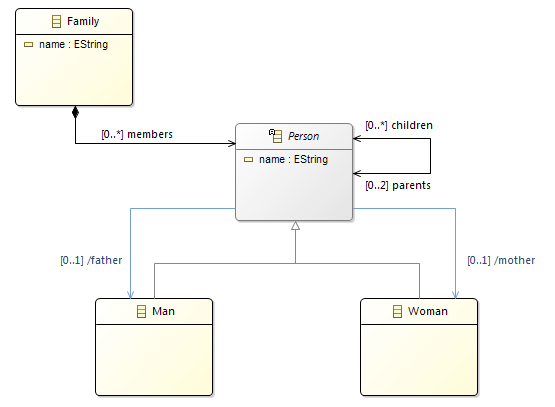
model,edit,editorのprojectは下記zip参照

http://eclipse.org/sirius/doc/resources/getstarted/basicfamily.zip


 プロジェクト作成

  1. New > Xtext > 「Xtext Project from Existing Ecore Model」
  2. Select Epackages で「Add...」 でBasicfamilyPackageを選択、Entry Rule を「Family」 を選択
    1. 既存のgenmodelを選択し、含まれているEPackageをインポート
    2. Entry RuleはDSLの包含関係のトップのEClassを指定
  3. New Xtext Projectは、新規作成と同じ

 DSL作成

  1. generate 宣言を定義
    1. 新規作成では作成されるが、ecoreから作成だとgenerateが作成されないため、定義が必要
  2. トップのクラス定義
    1. 既存のecoreをインポートしただけだと、buildした時にxtext無いのpackageが空のため、例外packageにからのため、例外がでる。  
           Caused by: java.lang.IllegalStateException: Generated package 'mydsl' may not be empty.
           at org.eclipse.xtext.xtext.generator.XtextGeneratorLanguage$2.add(XtextGeneratorLanguage.java:346)


      dslの設定例
      // automatically generated by Xtext
      grammar org.xtext.example.mydsl.MyDsl with org.eclipse.xtext.common.Terminals
      
      generate mydsl "http://www.eclipse.org/sirius/sample/basicfamily2" 
      
      import "http://www.eclipse.org/emf/2002/Ecore" as ecore
      import "http://www.eclipse.org/sirius/sample/basicfamily"
      
      // ↓↓↓追加↓↓↓
      Root:                            
       family=Family            
      ;                                
      // ↑↑↑追加↑↑↑
  3. Generate Xtext Artifactを実行する
    mode/generated/xxxx.ecoreが指定したecoreと関連付いている 


    複数パッケージが定義されているecoreの場合


    上記以外に「GenerateMyDsl.mwe2」を修正する。

    module org.xtext.example.mydsl.GenerateMyDsl
    
    import org.eclipse.xtext.xtext.generator.*
    import org.eclipse.xtext.xtext.generator.model.project.*
    
    var rootPath = ".."
    
    Workflow {
    // ↓↓↓追加↓↓↓
     bean = org.eclipse.emf.mwe.utils.StandaloneSetup{                                                   
      registerGeneratedEPackage="org.eclipse.sirius.sample.basicfamily.BasicfamilyPackage"        
                    // 複数のEPackageを使用する場合には、StandaloneSetupを追加して、registerGeneratedEPackageに使用するEPackageのクラスを指定する。
                    // 単一の場合はgenmodelから解釈されるため、定義不要。
     }
    // ↑↑↑追加↑↑↑


    疑問点

    1.  既存のecoreをそのままDSLにすることが出来ないのかが調査できていない。 

2015年8月8日土曜日

Eclipse SirusのValidation & QuickFixについて

Eclipse SiriusのValidation & QuickFixの設定方法について

基本的に以下の2点をViewSpecificaionに設定するだけでよい。

  • ViewSpecification のDiagram にValidationを追加
  • Validation のSemanticsを設定

とりあえず、今回は以下のようなものを設定します。


  • ManクラスにParentのreferenceがない場合、エラー
  • QuickFixとして、Womanクラスを紐づける。

すごい適当な設定ですが、サンプルということで。

ViewSpecification のDiagram にValidationを追加            

Diagram を選択 > New Validation
Validation を選択 > Semantic Validation Rule 

Semantic Validation を選択して、以下を設定
設定項目設定内容説明
LevelERRORValidationでNGの時の警告レベル
TargetClassbasicfamily.ManValidationを実施する対象クラス

message
Parent is not setValidation NGのメッセージ


Validation のSemanticsを設定                     

Semantic Rule を選択  > Audit

Auditを選択して、以下を設定
設定項目設定内容説明
Audit[self.parents->size() > 0 /]Parentが1つ以上の条件


Semantic Rule を選択 > Fix
Fix を選択 > Begin > New Operaion > Set

Seを選択して、以下を設定
設定項目設定内容説明
FeaturemotherQuickFixで設定するFeature
Value Expression[self.eContainer().eAllContents()->filter(Woman)->first()/]featureに設定する内容
Womanクラスの最初のクラス


Diagramを開いて
  • Manノードを作成
  • DiagramのContext Menu > Validation Diagram 


 Problem Viewにエラー内容が表示される。


エラー内容を選択し、右クリックでQuickFixを選択


Quick Fix画面が出て、Quick Fixを選択して、Finishを押下


上記Value Expressionで指定した値が設定される。


■参考
http://melb.enix.org/sirius/validation/